
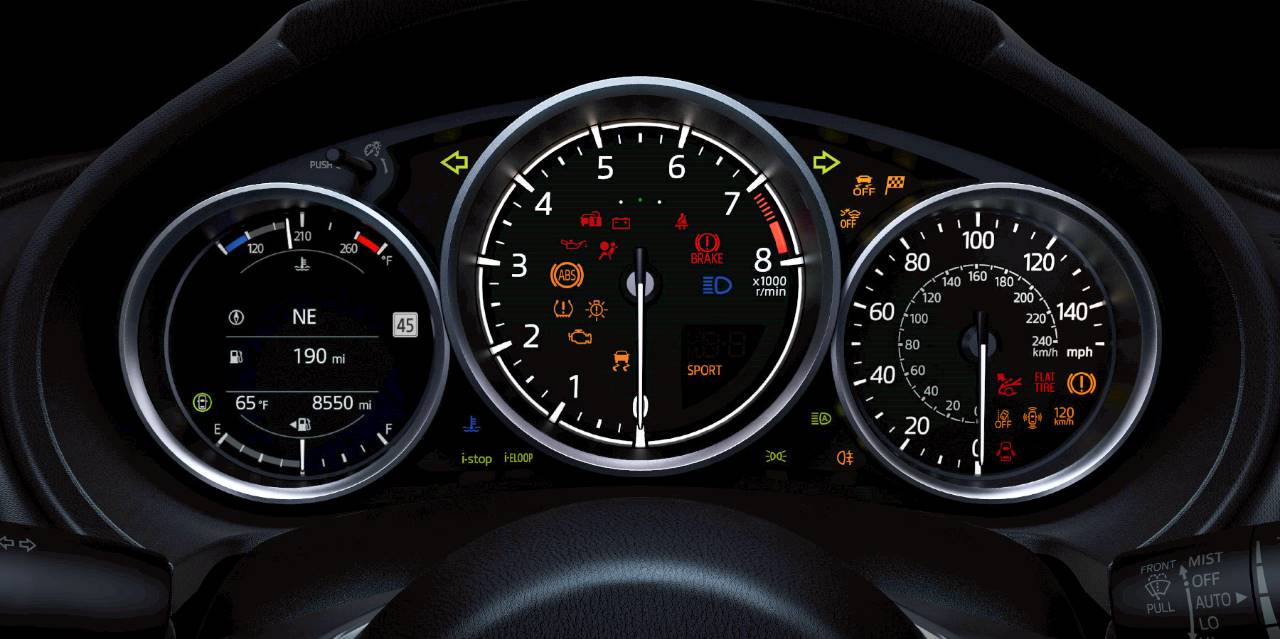
The only thing worse than seeing a dashboard warning light illuminated is having no idea why it’s lit. Heritage Mazda Catonsville created this warning light guide to give you some insight and peace of mind. Needless to say, we’re also here to take care of any necessary Mazda service indicated by those warnings.
Oil
If you see an icon that looks like an old oil can or maybe a genie’s lamp, this is related to the oil, as it’s a warning that it has lost pressure.
Brakes
An exclamation mark in a circle is a brake alert, and this could be telling you that the brake fluid is low.
Tires
If that exclamation mark is inside a horseshoe, this is letting you know that one or more tires have lost air pressure.
Engine
The Check Engine light looks like an engine, and it’s an umbrella warning for several potential issues, including things like emissions or fuel injector problems. If it comes on, we suggest tightening the gas cap as soon as you can safely do so; this solves the problem more often than you might think. If it doesn’t, visit us for diagnostics.
Battery
This light warns of a low battery charge and can indicate either an aged battery, an issue with your electrical system, or a fault with your vehicle’s alternator.
Airbag
A seated person with a circle in front of them indicates an airbag issue, and this could be related to the restraint system.
Temperature
If you notice an illuminated thermometer, this means that your engine is overheating. Pull over as soon as it’s safe, let the car cool down, and check your fluid levels.
Schedule MAZDA Service in Baltimore, MD
There are other lights to be aware of, but these are the most common. Don’t ignore them if you see them, because your car may “know” something is wrong before you do. If something has popped up, get in touch with the service center at Heritage Mazda Catonsville. Our team will diagnose the problem and make sure you get the right fix or replacement part.
